You increase your Meta Ads budget because your campaign has been performing well.
You expect more people to see your advertisements, more clicks, and hopefully more leads or purchases.
But when you check Meta Ads Manager a few days later, something looks wrong.
Your advertising spend has increased, yet your reach is falling.
CPM is higher, the same people seem to be seeing your advertisements repeatedly, and your cost per result is getting worse.
It is tempting to blame Meta's algorithm or increase the budget again.
However, Meta Ads Reach Dropping despite higher spending does not always mean there is a problem with the platform.
Sometimes, the campaign is reaching fewer unique people because auction costs have increased. In other cases, audience restrictions, creative fatigue, budget changes, or delivery settings are limiting reach.
The important thing is understanding what changed before making more adjustments.
In this guide, I'll explain why Meta Ads reach can decline even when you're spending more, which metrics to examine, and how to improve delivery without wasting your advertising budget.
What Does It Mean When Meta Ads Reach Is Dropping?
Reach represents the number of people who saw your advertisement at least once during the selected reporting period.
It is different from impressions.
Impressions count the total number of times an advertisement appears, including repeated views by the same person.
For example, imagine an advertisement receives 12,000 impressions and reaches 4,000 people.
The average frequency is three.
That means each person saw the advertisement approximately three times during the selected period.
Now imagine you increase your campaign budget.
Your impressions continue growing, but your reach remains flat or declines.
This could mean your advertisements are being shown more often to people already reached rather than reaching additional people.
It could also indicate that advertising impressions have become more expensive.
However, this pattern does not identify the cause on its own.
You need to examine CPM, frequency, targeting, creative engagement, and other delivery metrics.
Why Doesn't Increasing Your Meta Ads Budget Always Increase Reach?
Meta does not simply distribute advertisements to a fixed number of people based on the amount you spend.
Its advertising delivery system uses auctions to determine which advertisements appear to eligible users.
The auction considers factors such as the advertiser's bid, estimated action rates, and advertising quality.
For example, two businesses may compete to reach similar audiences.
One business increases its advertising budget.
But if auction competition increases or its advertisement becomes less competitive, the additional spending may not produce the expected increase in reach.
Higher budgets can also change how quickly your campaign reaches available audiences.
For a small audience, additional spending may result in more repeated impressions instead of reaching many new people.
This is why reach should be evaluated alongside your business objective.
A campaign reaching fewer people may still perform well if it generates qualified leads or profitable purchases.
10 Common Reasons Meta Ads Reach Drops Despite a Higher Budget
Here are the main issues to investigate.
| Possible Cause | What You May Notice | What to Review |
|---|---|---|
| Higher Auction Competition | CPM increases | CPM trends and campaign timing |
| Audience Saturation | Reach stagnates, frequency rises | Audience size and frequency |
| Creative Fatigue | CTR falls and costs rise | Creative performance |
| Restrictive Targeting | Limited audience expansion | Audience settings |
| Significant Budget Changes | Unstable performance | Last significant edit |
| Restrictive Bid Controls | Campaign underspends | Bid and cost controls |
| Learning Limited | Results remain inconsistent | Optimization event volume |
| Placement Distribution | Spend shifts across placements | Placement breakdown |
| Overlapping Ad Sets | Similar audiences receive divided budgets | Campaign structure |
| Delivery Restrictions | Low spend or impressions | Account limits, approval, schedule |
Each situation requires a different solution.
1. Your CPM Has Increased Because of Auction Competition
CPM stands for cost per thousand impressions.
It helps measure how much you pay to show advertisements.
If CPM increases, the same budget buys fewer impressions.
That can reduce reach, particularly when your advertisement frequency remains similar.
Example
Imagine your campaign spends $100 per day.
At a $10 CPM, the budget can buy approximately 10,000 impressions.
If CPM increases to $20, the same spending buys approximately 5,000 impressions.
Even if you increase the budget to $150, a $20 CPM would buy approximately 7,500 impressions.
That is still fewer than the original 10,000 impressions.
This example shows how reach can decline even when spending increases.
The actual number of unique people reached also depends on frequency.
How to Fix It
Open Meta Ads Manager and compare CPM across equivalent reporting periods.
Review whether CPM increased across the entire account or only specific campaigns.
Check whether the change coincides with seasonal competition, new targeting, or changes to the advertisement.
If CPM increases while engagement falls, review creative quality.
If CPM increases across several campaigns at the same time, auction conditions may be contributing.
Avoid increasing your budget solely to compensate for higher CPM without checking profitability.
2. Your Audience Is Becoming Saturated
Audience saturation occurs when an advertisement repeatedly reaches the same people and has fewer opportunities to reach new users within the eligible audience.
For example, a local business may target a small geographic area.
Its campaign initially reaches many relevant people.
Over time, the same audience sees the advertisements repeatedly.
When the business increases its budget, reach may not grow in proportion to spending.
Instead, frequency increases.
Signs of Audience Saturation
Review reach and frequency together.
If reach remains flat while impressions and frequency continue increasing, audience saturation becomes a possibility.
However, higher frequency does not automatically indicate a problem.
Retargeting campaigns may intentionally show advertisements multiple times to interested customers.
How to Fix It
Review your estimated audience size and targeting restrictions.
Check whether your audience is limited by narrow interests, age ranges, or geographic settings.
If appropriate, test broader targeting or Advantage+ Audience options.
You can also introduce new creative concepts that appeal to additional people within your audience.
For local businesses, maintain the geographic restrictions necessary to serve customers.
Expanding reach outside your actual service area is not useful simply because it increases the metric.
3. Your Advertising Creative Is Losing Effectiveness
Creative fatigue is another possible reason for declining reach and performance.
An advertisement may initially attract strong engagement.
Over time, the same audience may become less responsive.
You might notice lower CTR, increasing frequency, and a higher cost per result.
This pattern can indicate that your creative is no longer engaging people as effectively as before.
However, frequency alone does not prove creative fatigue.
You should examine several metrics together.
How to Fix Creative Fatigue
Review performance at the individual advertisement level.
Compare the CTR, frequency, CPM, and conversion results of different creative assets.
If an advertisement shows consistent deterioration, test a genuinely different concept.
For example, a fitness coaching business might test three angles:
- Personalized coaching support
- Training for busy professionals
- Client experiences and program structure
These approaches address different customer motivations.
Changing only the background color or first sentence may not create enough meaningful variation.
Include suitable image and video formats for your intended placements.
You can review Meta Ads Creative Testing as part of a structured approach to improving advertising performance.
4. Your Target Audience Is Too Narrow
Restrictive audience settings can limit the number of people eligible to see your advertisements.
For example, imagine an advertiser targeting people aged 30–35 in a small city while also applying several detailed interest restrictions.
The final eligible audience may be relatively small.
Increasing the budget does not remove those restrictions.
As spending increases, Meta may show advertisements repeatedly to the same audience.
How to Fix It
Review the targeting settings at the ad set level.
Look for unnecessary restrictions.
Consider whether some interests or demographic filters can be removed without weakening relevance.
Test broader audiences where suitable.
Advantage+ Audience may provide additional flexibility in eligible campaign setups.
However, do not assume that a prospecting campaign must have at least one million people in its audience.
That threshold appears in some industry guides, but it is not a universal requirement.
A local clinic, specialist consultancy, or niche B2B company may operate effectively with a smaller eligible audience.
The correct audience size depends on the business, market, objective, and expected results.
5. Your Budget Increase Has Affected the Learning Phase
Significant campaign changes can cause an ad set to re-enter Meta's learning phase.
During learning, the delivery system explores how to distribute advertisements and collect optimization results.
Performance may become less stable during this period.
Meta generally describes learning as stabilizing after approximately 50 optimization results in the week following the last significant edit, although this is not a guaranteed threshold.
Can a Budget Increase Reset Learning?
Yes, a significant budget change can cause an ad set to re-enter learning.
However, there is no universally guaranteed percentage below which all budget changes are safe.
The commonly recommended 15–20% increase is a practical guideline rather than a fixed protection against a learning reset.
How to Fix It
Review the Last Significant Edit column in Ads Manager.
Check whether the reach decline started after a budget adjustment.
Look for other changes made during the same period, including targeting, creative, and optimization event changes.
If the campaign is delivering, avoid making repeated changes without a clear reason.
Evaluate performance over a suitable period with enough data.
If your goal is to increase spending, plan budget changes based on campaign results rather than increasing spending simply because the current budget is being used.
6. Your Bid Cap or Cost Control Is Restricting Delivery
Some Meta Ads campaigns use bid controls to manage acquisition costs.
These controls can be useful.
However, restrictive settings may prevent the system from accessing enough auction opportunities.
For example, imagine a business typically acquires leads at $35.
If it sets an unrealistic cost or bid constraint, the campaign may struggle to find enough opportunities under that condition.
The result may be limited spending, fewer impressions, and lower reach.
How to Fix It
Review the active bid strategy.
Compare your cost controls with historical cost per result.
Check whether the campaign is consistently spending less than its allocated budget.
If bidding restrictions appear to be limiting delivery, consider testing a less restrictive approach.
However, don't remove important cost controls without considering profitability.
The objective is to balance delivery volume with sustainable acquisition costs.
7. Your Ad Sets Are Stuck in Learning Limited
Learning Limited indicates that Meta expects an ad set may not receive enough optimization results to exit learning.
This can happen when campaigns have low conversion volume or when results are divided across too many ad sets.
For example, a company may run six similar ad sets with a limited total budget.
Each ad set receives only a small amount of spending.
If few optimization events occur, individual ad sets may struggle to gather enough information for stable delivery.
How to Fix It
Review how many results each ad set generates.
Identify similar ad sets that may be suitable for consolidation.
Check whether the selected optimization event is occurring often enough.
However, do not automatically change Purchase optimization to Add to Cart solely to increase event volume.
Meta may then optimize toward people who add products without purchasing.
Similarly, an ad set showing Learning Limited can still produce profitable results.
The status alone does not justify pausing a campaign.
8. Meta Is Distributing Your Budget Across Different Placements
Meta advertisements can appear across eligible placements on Facebook, Instagram, Messenger, and other available surfaces.
Depending on your campaign settings, delivery can shift between placements.
For example, your campaign may previously have received most of its impressions from Facebook Feed.
Later, Meta may allocate more impressions to Instagram Reels or Stories.
Each placement has different auction conditions, audience behavior, and creative requirements.
A change in placement mix can affect CPM, reach, and conversions.
How to Check Placement Performance
Open Meta Ads Manager.
Select the campaign or ad set.
Use Breakdown → By Delivery → Placement.
Compare spending, impressions, CPM, and results across placements.
Also review platform-level performance.
Remember that reach figures from different placements should not simply be added together because the same person may see advertisements in multiple placements.
How to Fix It
Identify whether the placement shift is associated with weaker business results.
If one placement receives substantial spending but performs poorly, investigate further.
Make sure creative assets are suitable for the placements where they appear.
Consider a controlled placement test when the data supports it.
Avoid disabling placements only because their CPM is higher.
A more expensive placement may still produce better-qualified leads or customers.
9. Too Many Similar Ad Sets Are Dividing Your Budget
Campaigns can become unnecessarily complicated.
An advertiser may create separate ad sets for several interests, lookalike groups, and broad audiences.
These groups may target many of the same people.
Even when Meta manages auction eligibility between overlapping ad sets, a fragmented structure can divide spending and optimization results.
This can make performance harder to evaluate.
How to Fix It
Review your campaign structure.
Identify ad sets with similar targeting, offers, and optimization goals.
Consider combining them when there is no clear reason to keep them separate.
However, maintain separate groups where they serve a useful purpose.
For example, different countries, separate products, or controlled experiments may justify distinct ad sets.
A focused Meta Ads Campaign Structure makes it easier to understand spending and performance.
10. Account Restrictions or Delivery Settings Are Limiting Reach
Sometimes the issue is not auction competition or audience size.
Campaign settings may be restricting delivery.
Examples include account spending limits, payment problems, rejected advertisements, and scheduling restrictions.
A campaign with a higher budget can still struggle to spend if another restriction applies.
How to Fix It
Check the Delivery column for campaign and ad set statuses.
Review account billing and payment settings.
Confirm whether spending limits are active.
Check that advertisements have completed review and remain approved.
If your campaign uses ad scheduling, confirm that the selected hours match your advertising goals.
Also review whether the campaign has reached its end date or another configured limit.
Fix technical delivery restrictions before making creative or targeting changes.
How to Analyze a Meta Ads Reach Decline in Ads Manager
Before changing the campaign, compare performance over two suitable periods.
For example, compare the last seven complete days with the previous seven days.
For campaigns with low volume or longer buying cycles, a longer comparison period may be more useful.
Use the same reporting settings and attribution basis.
Step 1: Compare Spending and Reach
Check whether spending increased while reach decreased.
Step 2: Review CPM
Identify whether the campaign is paying more per thousand impressions.
Step 3: Check Frequency
Determine whether the same audience is seeing advertisements more often.
Step 4: Review CTR
Check whether audience engagement has declined.
Step 5: Inspect Delivery Status
Look for Learning, Learning Limited, or delivery restrictions.
Step 6: Review Placement Breakdown
Identify changes in where Meta distributes impressions and spending.
Step 7: Check Results and Cost Per Result
Determine whether lower reach also caused a decline in leads, purchases, or revenue.
This last step matters because reach alone is not always the main business objective.
Meta Ads Reach Troubleshooting Table
| What You Notice | Possible Explanation | First Action |
|---|---|---|
| Spend increases, reach decreases | Higher CPM or frequency | Compare CPM and frequency |
| CPM rises, CTR stays similar | Auction costs may have increased | Review competition and breakdowns |
| Frequency rises, CTR falls | Possible creative fatigue | Review and test creative |
| Reach flat, frequency increases | Possible audience saturation | Review targeting |
| Campaign underspends | Bid restrictions or account limits | Check delivery settings |
| Results become unstable after edits | Learning phase changes | Review edit history |
| One placement absorbs spending | Placement mix has shifted | Check placement results |
| Many similar ad sets produce few results | Fragmented campaign structure | Consider consolidation |
Use this table to identify where to investigate first.
It should not replace a review of actual account data.
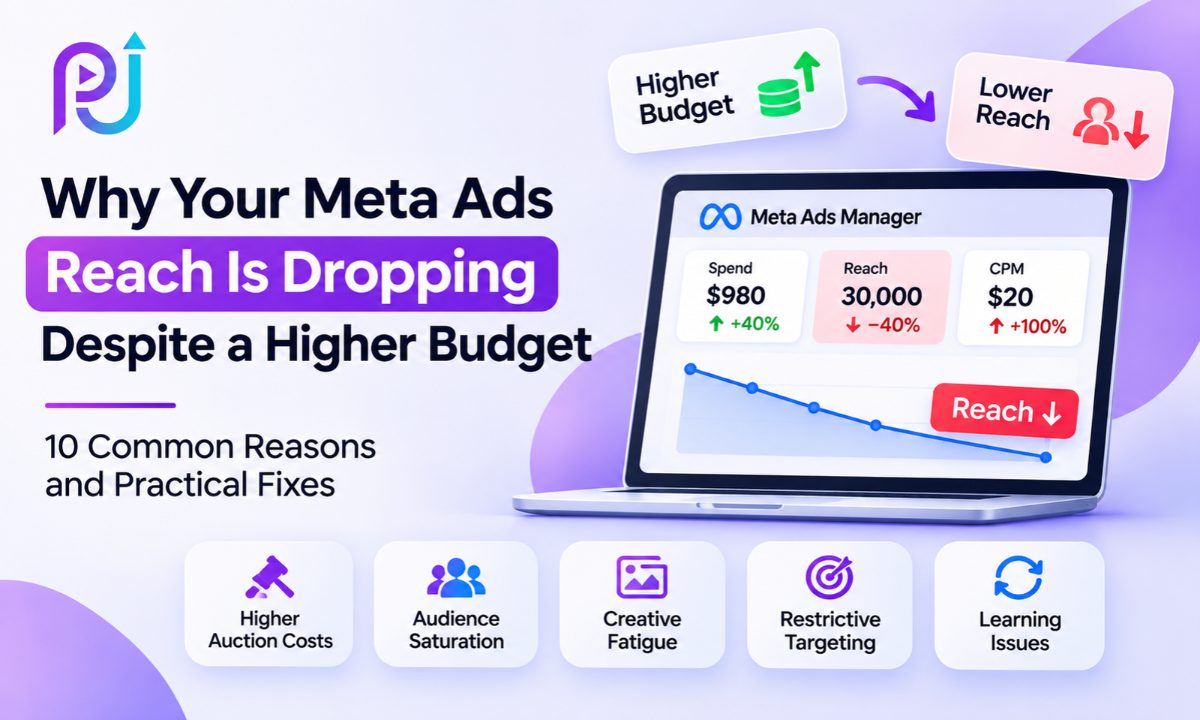
Example: Higher Meta Ads Budget but Lower Reach
Imagine a business running a Meta Ads lead-generation campaign.
During the first week, it spends $700.
The campaign generates 70,000 impressions and reaches 50,000 people.
Its CPM is $10.
During the following week, the business increases spending to $980.
However, CPM rises to $20.
The campaign now generates only 49,000 impressions.
If its average frequency also increases, total reach can fall substantially.
Performance Comparison
| Metric | Week 1 | Week 2 |
|---|---|---|
| Advertising Spend | $700 | $980 |
| Impressions | 70,000 | 49,000 |
| CPM | $10 | $20 |
| Reach | 50,000 | 30,000 |
| Frequency | 1.40 | 1.63 |
In this example, spending increased by 40%, but reach decreased by 40%.
The main measurable change is CPM, although frequency also increased.
The business should investigate auction costs, audience conditions, and creative performance before increasing the budget again.
These figures are hypothetical and illustrate how reach can decline despite higher spending.
Should You Increase Your Meta Ads Budget When Reach Is Dropping?
Not automatically.
Increasing spending may help when the campaign has room to reach more relevant people and the budget is genuinely restricting delivery.
However, it may not help when the audience is saturated, CPM is increasing, or bid controls are preventing spending.
Before increasing the budget, review your current cost per result and the quality of leads or purchases.
Also check whether the campaign is spending its existing budget.
If the campaign is underspending because of a restrictive bid setting, raising its budget may have little effect.
If the campaign is spending fully but reaching the same people repeatedly, an audience or creative adjustment may be more useful.
Budget decisions should support profitable results rather than reach targets alone.
How Advantage+ Audience Can Affect Reach
Advantage+ Audience gives Meta more flexibility to identify people who may complete your selected advertising objective.
This may help when manual targeting is too restrictive.
However, broader audience delivery does not guarantee better performance.
For example, a business targeting a specific service area should still maintain necessary location controls.
Likewise, a company promoting a specialized service should monitor whether additional reach produces qualified leads.
Test broader audience options when appropriate.
Compare reach, cost per result, and lead quality rather than assuming a larger audience is automatically better.
Why Conversion Tracking Matters When Meta Ads Performance Drops
A reach decline and a conversion reporting problem can happen at the same time.
For example, your campaign may still generate genuine website inquiries, but the Meta Pixel may fail to record them.
Or the browser Pixel and Conversions API may send duplicate events without correct deduplication.
These problems can make campaign performance harder to interpret.
How to Check Tracking
Open Meta Events Manager.
Review the selected optimization event.
Check whether events are being received.
Test a genuine conversion and verify that it is recorded correctly.
If you use both browser and server tracking, confirm that event names and event identifiers support proper deduplication.
Compare Meta reporting with actual CRM leads or business transactions.
Reliable Meta Pixel and Conversion Tracking helps businesses determine whether reported declines reflect real performance changes.
However, improving tracking does not automatically increase reach.
It improves the information available for measurement and optimization.
Why You Should Measure Leads and Sales Alongside Reach
Reach is useful for understanding advertising exposure.
But it does not tell you whether the campaign generated valuable customers.
For example, one campaign might reach 100,000 people and generate five leads.
Another might reach 30,000 people and generate twenty qualified leads.
The second campaign could be more valuable even though its reach is lower.
For lead-generation campaigns, review:
- Qualified leads
- Cost per qualified lead
- Appointments booked
- Customer acquisition cost
For eCommerce campaigns, review purchases, purchase value, cost per purchase, and ROAS.
You should also compare Meta's reported results with CRM or backend business data where possible.
Attribution settings and conversion reporting differences can affect what appears in Ads Manager.
A falling reach metric is worth investigating, but it does not always mean business performance has declined.
How to Prevent Meta Ads Reach From Declining
You cannot prevent every reach fluctuation.
Auction conditions and audience behavior change over time.
However, consistent monitoring can help identify problems before they become expensive.
Review Campaign Trends
Track reach, impressions, CPM, frequency, CTR, and cost per result.
Maintain Creative Variety
Prepare different advertising concepts and formats for suitable placements.
Avoid Unnecessary Significant Edits
Make campaign changes based on evidence.
Keep Targeting Relevant
Remove restrictions that no longer serve a clear purpose.
Monitor Budget Distribution
Check whether spending remains concentrated in the intended ad sets and placements.
Review Conversion Data
Confirm that leads and purchases are being measured correctly.
Compare Business Outcomes
Evaluate whether changes in reach affect qualified leads, revenue, and acquisition costs.
The objective is to detect changes early and respond with the right action.
When Should You Request a Meta Ads Audit?
A campaign audit can help when reach continues falling, CPM rises without a clear explanation, or higher budgets produce weaker results.
An audit should examine campaign structure, audiences, bidding, creative performance, placement distribution, and tracking.
It should also consider the advertiser's objective.
For a local business, the goal may be qualified inquiries from a defined service area.
For an online store, the goal may be profitable purchases.
For a SaaS company, it may be trial registrations and paid subscriptions.
These businesses should not evaluate success through reach alone.
You can explore examples of advertising and measurement work in the Digital Marketing Portfolio.
Why Work With Prem Jasuja for Meta Ads Optimization?
Prem Jasuja is a freelance digital marketing professional with experience across Meta Ads, Google Ads, conversion tracking, and lead generation.
His work includes campaign planning, advertising performance reviews, audience testing, and conversion measurement.
When a campaign loses reach, the first step is understanding whether the cause comes from auction costs, audience restrictions, creative engagement, or delivery settings.
The goal is to identify the actual problem before recommending budget or targeting changes.
You can learn more about Prem's background and experience as a Digital Marketing Consultant.
Final Thoughts
Meta Ads Reach Dropping despite a higher budget can be frustrating, but increasing spending again is not always the solution.
The decline may come from higher CPM, audience saturation, creative fatigue, restrictive bidding, or changes in campaign delivery.
It can also be connected to significant edits or a structure that divides results across too many ad sets.
Start by reviewing spending, impressions, CPM, reach, and frequency.
Then investigate the campaign settings and creative performance.
Most importantly, check whether lower reach is affecting actual business results.
A campaign reaching fewer people can still perform well when it reaches relevant customers at a sustainable cost.
The goal isn't simply to reach more people. It's to reach the right people and generate valuable results from your advertising budget.
Need Help With Meta Ads Reach or Performance?
If your Meta Ads reach is declining despite higher spending, a campaign review can help identify the likely cause.
Prem Jasuja provides support with Facebook and Instagram advertising, campaign optimization, creative testing, and tracking.
Learn more about Facebook Ads Management.
Frequently Asked Questions
Why Is My Meta Ads Reach Dropping Despite a Higher Budget?
Meta Ads reach may decrease despite higher spending because of rising CPM, audience saturation, creative fatigue, restrictive targeting, or changes in delivery. Compare reach with impressions, CPM, frequency, and campaign results to identify the likely cause.
Does Increasing the Meta Ads Budget Increase Reach?
Not always. A higher budget can create more delivery opportunities, but the result depends on auction costs, audience availability, frequency, targeting, and other campaign settings. Increasing spending does not guarantee reaching more unique people.
How Do I Fix Low Reach in Meta Ads?
Start by checking whether your campaign is spending its budget. Review CPM, frequency, audience size, bid controls, delivery status, and placement performance. Make changes based on the specific restriction or performance issue identified.
Can Creative Fatigue Cause Facebook Ads Reach to Drop?
Creative fatigue can contribute to weaker advertising performance. If frequency increases while CTR and conversion results decline, your audience may be responding less to the creative. Review these metrics together before refreshing advertisements.
What Is a Good Frequency for Meta Ads?
There is no universal ideal frequency. The appropriate level depends on your advertising objective, audience, campaign duration, and past performance. Evaluate frequency alongside reach, CTR, and conversions rather than relying on a fixed number.
Can Increasing My Budget Reset the Meta Ads Learning Phase?
A significant budget change may cause an ad set to re-enter learning. However, Meta does not guarantee that every budget increase below a specific percentage will avoid a reset. Review the Last Significant Edit column and campaign performance after making changes.
Does Advantage+ Audience Help Increase Meta Ads Reach?
Advantage+ Audience can help expand delivery beyond some manual audience suggestions when Meta identifies suitable opportunities. However, results depend on the campaign, and broader reach does not automatically mean more qualified leads or purchases.
Why Is My Facebook Ads CPM Increasing?
CPM may increase because of auction competition, changes in audience or placements, seasonal advertising demand, or weaker advertising quality. Compare CPM trends with reach, CTR, creative performance, and campaign settings to understand the change.
Should I Pause Meta Ads When Reach Starts Dropping?
Not automatically. First, determine whether the reach decline is also reducing qualified leads, purchases, or revenue. A campaign with lower reach can still be profitable. Pause or change advertisements when performance evidence supports that decision.
How Can I Improve Meta Ads Reach Without Increasing My Budget?
You can review unnecessary targeting restrictions, test new creative concepts, inspect placement distribution, simplify overlapping ad sets, and check bid controls. The right improvement depends on what is limiting delivery in your campaign.