Your Google Ads account shows 100 conversions this month. The cost per lead looks reasonable, and your campaigns seem to be performing well.
But when you speak with your sales team, the story changes.
Many leads never answer their phones. Some people submitted forms by mistake. Others are looking for services you do not provide.
Only a small number are serious potential customers.
This is where Lead Quality Tracking becomes important.
Most businesses track how many leads their advertising generates. Far fewer track what happens after those leads reach the sales team.
A completed form does not automatically mean a qualified prospect.
A phone call does not guarantee a sale.
And a low cost per lead does not always mean an advertising campaign is profitable.
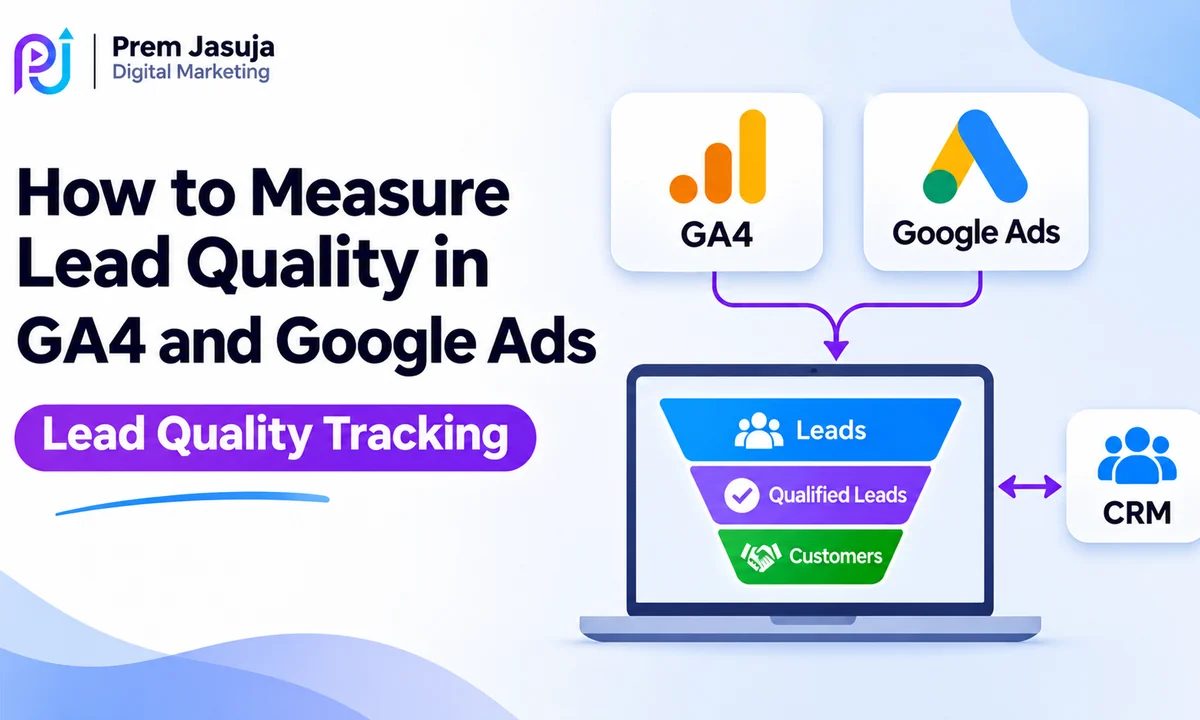
By connecting Google Analytics 4 (GA4), Google Ads, and your Customer Relationship Management (CRM) system, you can measure which campaigns generate genuine sales opportunities.
The goal is simple: Stop judging advertising performance only by lead volume. Start measuring which leads become customers.
This guide explains how lead quality tracking works, how to connect your marketing and sales data, and how to use that information to make better advertising decisions.
What Is Lead Quality Tracking?
Lead quality tracking is the process of measuring whether advertising-generated inquiries match your ideal customer profile and progress toward a meaningful business outcome.
Instead of counting every form submission as equal, you evaluate the value of each inquiry.
For example, imagine two people submitting a form on a Google Ads landing page.
The first person wants to hire your company, has a realistic budget, and needs the service within two weeks.
The second person is researching prices for a project they may never pursue.
Both count as form submissions.
However, their potential business value is different.
Lead quality tracking helps businesses recognize that difference.
It can include information such as customer requirements, service location, budget suitability, sales qualification, appointment completion, and closed revenue.
The specific definition of a qualified lead should reflect your business and sales process.
Why Lead Quality Matters More Than Lead Volume
A campaign can generate inexpensive leads without producing profitable customers.
Consider this hypothetical comparison.
| Metric | Campaign A | Campaign B |
|---|---|---|
| Ad Spend | $2,000 | $2,000 |
| Total Leads | 100 | 50 |
| Cost Per Lead | $20 | $40 |
| Qualified Leads | 15 | 30 |
| Cost Per Qualified Lead | $133.33 | $66.67 |
| Customers | 3 | 9 |
These figures are illustrative, not actual client results.
Campaign A produces more leads at a lower CPL.
However, Campaign B generates twice as many qualified leads and three times as many customers.
If you judge performance only by cost per lead, Campaign A appears stronger.
Once you measure lead quality, Campaign B becomes the more valuable campaign.
This is why conversion measurement should follow the customer journey beyond the initial inquiry.
Understanding the Lead Generation Funnel
Before setting up tracking, define what happens between someone clicking your advertisement and becoming a customer.
A typical lead generation funnel might look like this:
| Funnel Stage | Meaning |
|---|---|
| Ad Click | Someone clicks your advertisement |
| Lead Submitted | A form or qualifying inquiry is received |
| Lead Verified | Contact details and authenticity are checked |
| Qualified Lead | The prospect meets your business criteria |
| Sales Opportunity | The sales team identifies a realistic opportunity |
| Converted Lead | The prospect completes the defined sales milestone |
| Customer | The business closes a sale |
Not every company needs all these stages.
A local repair business may move directly from an inquiry to a booked job.
A B2B software company may require a demo, sales review, proposal, and contract.
Your tracking setup should match the actual customer journey.
Google Ads also provides lead journey mapping capabilities to help advertisers represent key funnel stages and connect them with appropriate conversion goals.
How GA4, Google Ads, and Your CRM Work Together
Each platform plays a different role in lead quality measurement.
Google Analytics 4: Website Behavior
GA4 helps you understand what visitors do on your website.
You can measure actions such as completed lead forms, consultation requests, and other relevant events.
It also provides information about traffic sources and landing page engagement.
However, GA4 does not automatically know whether a salesperson qualified a lead or closed a deal.
Google Ads: Advertising Performance
Google Ads measures advertising interactions and configured conversion actions.
It helps you evaluate campaign costs, conversion volume, bidding performance, and attributed conversion value.
When you send qualified lead or converted lead outcomes back to Google Ads, you can evaluate advertising performance against deeper business results.
CRM: Sales Quality and Revenue
Your CRM records what happens after someone becomes a lead.
It may track whether the prospect was contacted, qualified, scheduled for a meeting, given a proposal, or converted into a customer.
Common CRM platforms include HubSpot, Salesforce, and Zoho CRM.
Your CRM can act as the main record of lead status and closed revenue, provided your team maintains the data accurately.
When these systems exchange the right information, you can connect advertising activity with meaningful sales outcomes.
Step 1: Define What Counts as a Qualified Lead
Before connecting any tools, agree on what a good lead means.
This is one of the most important parts of Lead Quality Tracking.
For example, a local HVAC company may consider a lead qualified when:
- The customer is within its service area.
- The inquiry concerns a service it provides.
- The contact details are valid.
- The customer has a genuine service requirement.
- The sales team can follow up.
A B2B consulting company may use different criteria, including company size, service requirements, buying authority, and potential project value.
These definitions should be clear enough for your sales team to apply consistently.
You can create CRM stages such as New Lead, Contacted, Qualified, Opportunity, Won, and Lost.
The exact labels are less important than having a consistent process.
Avoid relying only on subjective scores without checking whether those scores relate to actual sales outcomes.
Step 2: Set Up Lead Events in GA4
GA4 uses events to record user activity.
For lead-generation websites, a commonly recommended event is generate_lead, which can represent a successful lead submission.
Depending on your business, you may also track actions such as appointment bookings, completed applications, or purchases.
The important point is to track successful actions rather than simply counting clicks on a submit button.
For example, a form submission should not count as a completed lead if the form fails validation or displays an error.
How to Set Up Lead Tracking
First, identify the exact action you want to measure.
Then configure the event through your website, Google tag, or Google Tag Manager.
Test the event using GA4 DebugView and relevant tag testing tools.
Confirm that it fires when the action succeeds and does not fire more than intended.
Finally, mark the relevant event as a key event in GA4 when it represents an important business action.
If you need help checking form events, tracking accuracy, and tag configuration, explore Conversion Tracking and GA4 Setup Services.
Can GA4 Track Qualified Leads?
Yes, GA4 can receive custom events that represent later lead stages when you build an appropriate integration.
For example, your CRM might trigger a server-side process when a lead becomes qualified.
However, connecting that event to the correct GA4 user or session requires a valid identifier strategy.
Sending a Google Click ID as an arbitrary GA4 event parameter does not automatically connect a CRM event to the original GA4 user or session.
For server-side measurement, follow the relevant GA4 Measurement Protocol requirements and use supported identifiers.
Do not send personal information such as raw email addresses or phone numbers into GA4 event parameters.
Step 3: Link GA4 With Google Ads
Linking GA4 and Google Ads helps connect website measurement with advertising reporting.
To link the accounts:
- Open GA4 and select the correct property.
- Go to Admin.
- Find the Google Ads Links option under Product links.
- Select the relevant Google Ads account.
- Complete the linking process and review available settings.
Make sure your Google Ads account uses auto-tagging where appropriate.
You can then review which GA4 key events should be available for Google Ads conversion measurement.
Not every event needs to become a Google Ads bidding goal.
For example, a business might track form submissions, phone clicks, and appointment bookings.
However, treating every action as an equally valuable primary conversion can make reporting and bidding less meaningful.
Review your conversion goals before deciding which actions should guide optimization.
Step 4: Capture Lead Information in Your CRM
When someone submits a lead form, your CRM should receive enough information to manage the inquiry and support attribution.
Useful fields may include:
| CRM Field | Purpose |
|---|---|
| Lead ID | Identifies the lead in your system |
| Created Date | Records when the inquiry arrived |
| Lead Source | Identifies the acquisition channel |
| Campaign Information | Helps connect inquiries with marketing activity |
| Contact Status | Shows whether the lead was reached |
| Qualification Status | Records whether the lead meets your criteria |
| Opportunity Value | Represents a potential deal |
| Deal Status | Shows whether the opportunity progressed |
| Closed Revenue | Records actual sales value |
Where appropriate, preserve advertising click identifiers and permitted first-party information needed for conversion matching.
Google Ads click identifiers can include GCLID, GBRAID, or WBRAID depending on the environment and implementation.
Do not assume that every click will produce the same identifier.
Your website, forms, CRM, and tracking system must handle these values correctly and respect relevant consent and privacy requirements.
Step 5: Send Qualified Lead Data Back to Google Ads
This is where lead quality tracking becomes more useful for campaign optimization.
Instead of reporting only a form submission, you can send later sales outcomes back to Google Ads.
For example, your CRM may record when a lead becomes qualified or when a sale closes.
Google Ads supports conversion categories such as Qualified Lead and Converted Lead.
These allow advertisers to measure downstream stages that take place outside the website.
What Are Enhanced Conversions for Leads?
Enhanced conversions for leads helps connect eligible offline lead outcomes with Google Ads interactions by using permitted first-party customer data.
For example, your website may collect an email address during a lead submission.
When that lead reaches a meaningful CRM stage, your integration can upload the corresponding conversion event with appropriately processed matching information.
Google uses supported matching methods to help attribute eligible conversions to advertising interactions.
For new implementations, Google Ads Data Manager is an important way to connect CRM sources and configure enhanced conversions for leads.
Google's official Best Practices for Generating High-Quality Leads recommends measuring qualified lead outcomes, using relevant conversion goals, and importing fresh CRM data.
Practical Setup Process
- Configure reliable website lead tracking.
- Confirm that permitted first-party customer information can be captured for matching.
- Create a Qualified Lead or Converted Lead conversion action in Google Ads.
- Connect a supported CRM or data source through Google Ads Data Manager.
- Map CRM fields to the conversion data requirements.
- Set up regular imports or synchronization.
- Test whether eligible CRM outcomes appear in Google Ads.
- Check for duplicates, rejected uploads, and attribution gaps.
Google changed parts of its enhanced conversions and API configuration during 2026, so use current Data Manager documentation rather than relying on older API tutorials.
Also avoid uploading the same sales event through multiple methods without a clear deduplication strategy.
Step 6: Measure Cost Per Qualified Lead
Once your conversion data is reliable, you can move beyond cost per form submission.
Three metrics are particularly useful.
Cost Per Lead (CPL)
Cost Per Lead = Advertising Spend ÷ Total Leads
If you spend $1,500 and generate 75 leads:
CPL = $20
Cost Per Qualified Lead (CPQL)
Cost Per Qualified Lead = Advertising Spend ÷ Qualified Leads
If 25 of those leads are qualified:
CPQL = $60
Lead-to-Customer Conversion Rate
Lead-to-Customer Rate = Customers ÷ Total Leads × 100
If eight of those leads become customers:
Lead-to-Customer Rate = 10.67%
These metrics tell different parts of the story.
CPL reflects the cost of obtaining inquiries.
CPQL reflects the cost of obtaining leads that meet your qualification criteria.
The lead-to-customer rate helps reveal whether inquiries progress to sales.
For businesses with longer sales cycles, measure cohorts over a suitable time period so recent leads have enough time to progress.
Step 7: Improve Google Ads Bidding Using Lead Quality Data
Once Google Ads receives reliable qualified lead outcomes, you can evaluate whether those outcomes should guide bidding.
The correct approach depends on conversion volume, data quality, lead values, and sales delays.
Maximize Conversions
Maximize Conversions aims to generate as many selected conversions as possible within the available budget.
If you only select form submissions as your primary conversion goal, the system will optimize toward those submissions.
This may be appropriate initially, particularly when qualified lead data is not yet available or reliable.
Target CPA
A Target CPA approach helps Google Ads work toward a desired average acquisition cost for the selected conversion action.
When qualified lead measurement is reliable and sufficient data is available, using qualified leads as the relevant bidding objective may improve alignment with sales goals.
However, targets should be based on actual performance.
Setting an unrealistically low target can restrict traffic and conversion volume.
Maximize Conversion Value and Target ROAS
When you can assign meaningful and reliable values to different leads or sales outcomes, value-based bidding may become relevant.
For example, a closed deal worth $10,000 may be more valuable than a smaller contract worth $1,000.
However, value-based bidding requires careful measurement.
Do not assign arbitrary large values to every qualified lead simply to increase reported ROAS.
Conversion values should have a reasonable relationship to expected or realized business value.
Google currently recommends considering at least 15 conversions in the last 30 days at the account level for a selected lead-generation bidding goal, along with fresh data and short conversion delays where possible.
This is published best-practice guidance, not a universal guarantee of performance or a blanket platform eligibility rule.
Google also recommends avoiding mixed bidding goals drawn from different stages of the same lead journey when that would create conflicting optimization signals.
For businesses looking to improve their campaign structure and bidding strategy, Google Ads Management Services covers campaign optimization and conversion-focused advertising.
Step 8: Build a Lead Quality Dashboard
A useful dashboard should connect marketing performance with sales outcomes.
For example:
| KPI | What It Tells You |
|---|---|
| Ad Spend | Total advertising investment |
| Leads | Total inquiries generated |
| Qualified Leads | Leads meeting your qualification criteria |
| Qualification Rate | Share of leads that qualify |
| Cost Per Qualified Lead | Cost of acquiring qualified inquiries |
| Opportunities | Leads progressing to real sales opportunities |
| Customers | Completed customer acquisitions |
| Customer Acquisition Cost | Cost per acquired customer |
| Revenue | Sales associated with tracked leads |
| ROAS | Attributed revenue relative to ad spend |
For reporting, you can combine data from Google Ads, GA4, and CRM systems in an appropriate reporting environment.
Looker Studio and BigQuery may be useful depending on your technical requirements.
However, simply placing GA4 and CRM data in the same dashboard does not automatically create accurate user-level attribution.
The underlying identifiers, data joins, and attribution rules still need to be correct.
Common Lead Quality Tracking Mistakes
Counting Every Inquiry as a Valuable Lead
A form submission shows that someone completed an action.
It does not prove purchasing intent or commercial suitability.
Tracking Button Clicks Instead of Successful Actions
A form button click can happen without a successful submission.
Track validated completion wherever possible.
Missing CRM Source Information
Without suitable attribution fields, it becomes harder to connect sales outcomes with the original marketing activity.
Using Incorrect Primary Conversion Goals
If Google Ads optimizes toward low-value actions, campaign results may look strong without producing meaningful business outcomes.
Importing CRM Data Too Late
Long delays between a lead becoming qualified and sending the update to Google Ads can reduce how useful the information is for timely optimization.
Google recommends frequent uploads, ideally daily, for relevant offline lead data.
Double-Counting Conversions
Multiple tags or imports can sometimes report the same business action more than once.
Review event firing, conversion settings, and deduplication methods.
Ignoring Lead Quality After the Initial Campaign Setup
Customer needs and lead quality can change.
Review sales feedback and adjust qualification criteria when there is a clear business reason.
Lead Quality Tracking for Different Business Types
Local Service Businesses
For local companies, quality may depend on the customer's location, requested service, urgency, and booking status.
A plumbing company might track verified service requests and completed appointments rather than every phone number click.
B2B Service Companies
B2B businesses often have longer buying cycles.
A qualified lead may need to match the company's ideal customer profile and have a genuine business requirement.
CRM opportunity creation and closed deals become important measurement stages.
SaaS Companies
SaaS businesses may track trials, activated users, product-qualified leads, demos, and paid subscriptions.
The best conversion goal depends on which stage has enough volume and a meaningful relationship with customer value.
Healthcare and Appointment-Based Services
Appointment-based businesses may care about legitimate bookings and completed visits.
Tracking should respect privacy requirements and avoid exposing sensitive customer information to advertising or analytics tools.
The right measurement setup depends on the business model, not just the advertising platform.
When Should You Hire a Conversion Tracking Specialist?
A professional tracking review may be useful when your Google Ads conversion numbers do not match your CRM records, lead quality remains unclear, or your business cannot identify which campaigns generate paying customers.
Tracking specialists can help review GA4 events, Google Tag Manager configuration, Google Ads conversion actions, CRM integration, and lead reporting.
They can also check whether current measurement supports your advertising goals.
Prem Jasuja works across Google Ads, GA4, Google Tag Manager, and conversion tracking.
You can review examples of his advertising and tracking work in the Digital Marketing Portfolio.
Why Work With Prem Jasuja for Lead Quality Tracking?
Prem Jasuja is a freelance digital marketing professional with experience in Google Ads, Meta Ads, GA4, Google Tag Manager, and conversion measurement.
His work covers SaaS businesses, local services, B2B companies, and eCommerce brands.
A reliable tracking setup helps businesses understand the difference between advertising activity and real commercial outcomes.
The process may involve defining conversion actions, checking tag accuracy, reviewing CRM integration requirements, and developing reporting around meaningful business metrics.
The right implementation depends on your existing website, CRM platform, advertising setup, and available customer data.
Explore Conversion Tracking Services to learn how accurate tracking can support better marketing decisions.
Final Thoughts
Lead Quality Tracking helps businesses answer a question that basic conversion reporting often misses:
Which advertising leads become real customers?
GA4 can measure important website actions.
Google Ads can measure advertising conversions and receive eligible downstream outcomes.
Your CRM can record whether prospects qualify, progress through sales, and generate revenue.
Connecting these systems with reliable measurement allows you to evaluate campaign performance beyond cost per lead.
However, accurate tracking requires more than installing tags.
You need clear lead qualification rules, correct conversion events, consistent CRM data, secure matching methods, and ongoing validation.
Start by identifying what a qualified lead means to your business.
Then measure each important stage and use that information to guide advertising decisions.
The goal is not to generate the largest number of leads. It is to understand which marketing activities create valuable customer opportunities.
Need Help Measuring Your Google Ads Lead Quality?
If your campaigns generate inquiries but you cannot tell which ones become customers, your conversion tracking setup may need a closer review.
Prem Jasuja provides support for GA4, Google Tag Manager, Google Ads conversion measurement, and CRM-related tracking requirements.
Explore Conversion Tracking and GA4 Setup to discuss your measurement needs.
Frequently Asked Questions
What Is Lead Quality Tracking?
Lead Quality Tracking is the process of measuring whether marketing-generated inquiries meet business qualification criteria and progress toward meaningful outcomes such as appointments, opportunities, or sales.
How Can I Measure Lead Quality in Google Ads?
You can measure lead quality by connecting Google Ads conversion data with qualified lead or converted lead outcomes from your CRM. This helps you evaluate campaigns beyond initial form submissions.
Can GA4 Track Qualified Leads?
Yes. GA4 can receive configured events representing qualified leads when supported tracking and CRM integration are implemented. However, GA4 does not automatically know which inquiries become qualified or connect them to the original user without appropriate identifiers.
What Is the Difference Between a Lead and a Qualified Lead?
A lead is a person who expresses interest or submits an inquiry. A qualified lead meets specific business criteria that indicate a reasonable fit for the product or service.
What Is Cost Per Qualified Lead?
Cost Per Qualified Lead is the advertising cost divided by the number of qualified leads generated. It helps businesses evaluate acquisition efficiency based on lead quality rather than total inquiries.
What Are Enhanced Conversions for Leads?
Enhanced conversions for leads is a Google Ads measurement feature that uses permitted first-party customer data to help match eligible offline lead outcomes with advertising interactions and improve conversion attribution.
How Do I Connect My CRM With Google Ads?
You can use Google Ads Data Manager or supported integrations to connect CRM data sources and import eligible qualified lead or converted lead events. The setup depends on your CRM and tracking requirements.
Should Google Ads Optimize for Form Submissions or Qualified Leads?
The appropriate goal depends on your campaign and data. Qualified leads may better represent business value, but reliable measurement and sufficient conversion volume are important before making them the primary bidding objective.
Why Are My Google Ads Leads Not Turning Into Customers?
Possible causes include irrelevant search traffic, weak qualification, form spam, poor follow-up, unsuitable offers, landing page issues, or inaccurate conversion tracking. Review the full lead journey before choosing a solution.
How Often Should I Upload Qualified Lead Data to Google Ads?
Google recommends frequent uploads, ideally daily, for applicable offline lead conversion data. Regular updates help keep conversion reporting and bidding signals timely, subject to the actual sales cycle and integration setup.