Google Ads can be a great way to bring customers to your business. But running advertisements does not guarantee that your budget is being used effectively.
Many businesses spend hundreds or thousands of dollars every month on Google Ads without knowing which campaigns generate valuable leads and sales.
You might notice increasing advertising costs, fewer inquiries, irrelevant clicks, or poor conversion rates. Sometimes, the problem is not your budget. It is how your campaigns are set up, tracked, and managed.
This is where a google ads audit can help.
A Google Ads audit reviews your advertising account to identify performance issues, wasted spending, tracking problems, and opportunities for improvement.
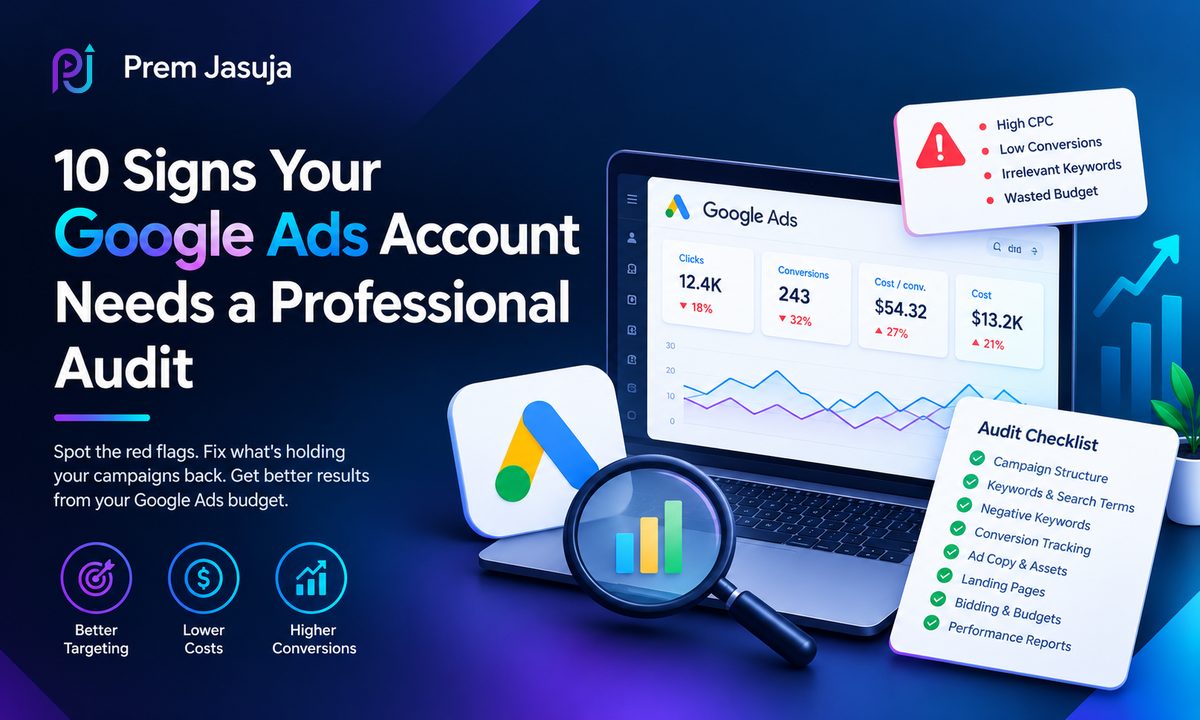
Your Google Ads account may need a professional audit if advertising costs keep increasing, campaigns receive clicks but few conversions, irrelevant searches consume your budget, conversion tracking is inaccurate, or you cannot explain which campaigns generate customers.
This guide explains 10 warning signs that suggest your Google Ads account needs attention, what causes these problems, and how to identify opportunities to improve performance.
What Is a Google Ads Audit?
A Google Ads audit is a detailed review of your advertising account to understand how campaigns perform and identify problems that may affect results.
It involves examining campaign settings, advertising budgets, keywords, search terms, bidding strategies, conversion tracking, advertisements, and landing pages.
The goal is to understand whether your campaigns support your business objectives and whether the account is using its advertising budget effectively.
A professional Google Ads audit typically covers:
- Campaign Structure: Reviewing campaigns, ad groups, and targeting settings.
- Keyword Performance: Identifying which keywords generate relevant traffic and conversions.
- Search Terms: Checking the actual searches that trigger advertisements.
- Negative Keywords: Finding opportunities to exclude irrelevant searches.
- Conversion Tracking: Confirming that leads and purchases are measured correctly.
- Budget Allocation: Reviewing how advertising spend is distributed.
- Bidding Strategies: Checking whether bidding settings match business goals.
- Ad Copy and Assets: Reviewing headlines, descriptions, images, and other ad assets.
- Landing Pages: Evaluating the pages visitors reach after clicking advertisements.
- Performance Reporting: Understanding cost per lead, sales, revenue, and return on advertising spend.
An audit is not simply about finding mistakes.
It can also identify opportunities to improve campaigns that already generate good results.
Why Does Your Google Ads Account Need Regular Audits?
Customer behavior, competition, and advertising costs can change over time.
A campaign that performed well several months ago may need adjustments as your business develops.
For example, an online store may introduce new products, change prices, or update shipping policies.
A local service business may expand into additional cities or change its service offerings.
If your Google Ads campaigns do not reflect these changes, they may attract the wrong customers or miss valuable opportunities.
Regular audits help you evaluate whether your advertising strategy still matches your business goals.
They can also identify issues that develop without an obvious warning, such as broken conversion tracking, irrelevant searches, or outdated landing pages.
Let's look at the 10 signs that deserve attention.
1. Your Google Ads Spend Is Increasing but Leads and Sales Are Not
One of the clearest warning signs is increasing advertising spending without a meaningful improvement in business results.
For example, imagine your business spent $1,500 last month and generated 50 leads.
This month, you spent $2,000 but received only 40 leads.
Your cost per lead increased from $30 to $50.
This does not automatically mean the account is poorly managed. Seasonal demand, competition, and lead quality can influence results.
However, the change deserves investigation.
Possible Causes
- Increased competition for important keywords.
- Poor keyword selection.
- Changes in customer demand.
- Weak landing page performance.
- Incorrect conversion tracking.
- Budget being directed toward less effective campaigns.
What Should You Check?
Start by comparing your advertising spend, conversions, cost per conversion, and conversion rates over similar periods.
Review whether the additional spending generated qualified customers or simply increased traffic.
Look at campaign-level performance to understand which campaigns are responsible for the change.
How to Improve It
Identify campaigns that generate valuable leads or sales and investigate those that consume budget without supporting your goals.
You may need to adjust keyword targeting, update ads, improve landing pages, or review bidding strategies.
A google ads audit helps determine whether the issue comes from advertising costs, traffic quality, conversion tracking, or the website itself.
2. Your Google Ads Receive Clicks but Few Conversions
Clicks show that people are interested enough to visit your website.
However, clicks alone do not generate revenue.
If your campaigns attract visitors but produce few inquiries or purchases, something in the customer journey may need attention.
For example, a cleaning company might receive 500 Google Ads clicks but only three contact form submissions.
The problem could be related to the search terms, advertisements, landing page, or offer.
Possible Causes
Irrelevant Traffic: Your advertisements may appear for searches unrelated to your services.
Poor Landing Page Experience: Visitors may struggle to find the information they need.
Weak Call to Action: Your website may not explain what visitors should do next.
Tracking Problems: Leads may be generated but not recorded correctly.
Uncompetitive Offers: Your pricing, service details, or selling points may not match customer expectations.
What Should You Check?
Compare the search terms report with your landing page content.
Check whether advertisements clearly describe what your business offers.
Test your contact forms, phone buttons, and appointment booking process.
Also review mobile usability because many visitors may interact with your website using smartphones.
How to Improve It
Focus on attracting people with relevant search intent.
Send visitors to pages that match the service or product mentioned in the advertisement.
For example, someone searching for "emergency roof repair" should reach a page about emergency roof repair rather than a general homepage.
Clear service details, customer reviews, and simple contact options can help visitors take action.
If your website needs improvements, explore Landing Page Development.
3. Your Search Terms Report Contains Irrelevant Searches
The search terms report is one of the most useful areas to review during a Google Ads audit.
It shows many of the actual searches that triggered your advertisements.
This helps you understand whether your campaigns are attracting people interested in your products or services.
For example, imagine you operate a company offering professional website development.
You want customers searching for website development services.
However, your advertisements may also appear for searches such as:
- Free website development course
- Website developer jobs
- Learn website coding
- Website design internship
- Free website templates
These searches may not match your business goals.
If people click your ads after making unrelated searches, your advertising budget may be wasted.
What Should You Check?
Open the search terms report and review the searches that generated clicks and spending.
Look for searches that indicate low buying intent or a different need from the services you provide.
Remember that Google may omit certain low-volume search queries from the report for privacy reasons, so the report does not provide a complete view of every search.
How to Improve It
Identify irrelevant queries and add suitable negative keywords.
You can also review keyword match types and campaign targeting.
For example, a business offering paid website design services may exclude searches related to jobs or free training when those searches are unrelated to its objectives.
Avoid excluding broad terms without reviewing their meaning.
A negative keyword that seems irrelevant in one context may prevent valuable traffic in another.
Regular search term reviews can help improve traffic quality and reduce unnecessary spending.
4. Your Negative Keyword List Is Missing or Outdated
Negative keywords help prevent advertisements from appearing for searches that do not match your business.
They are important for maintaining relevant traffic.
For example, a company selling premium hunting backpacks may not want to advertise to people searching for free backpack patterns or second-hand products.
Without suitable exclusions, campaigns may attract visitors who are unlikely to purchase.
Signs of a Negative Keyword Problem
- Search terms contain unrelated products or services.
- Campaigns receive clicks from job seekers.
- People search for free information rather than paid services.
- The same irrelevant queries appear repeatedly.
- Negative keyword lists have not been reviewed despite changes in business offerings.
What Should You Check?
Review campaign-level and account-level negative keyword settings.
Compare existing exclusions with recent search term data.
Also check whether negative keyword lists conflict with valuable search terms.
How to Improve It
Build negative keyword lists based on actual search behavior.
For example, a local plumbing company may find that searches related to plumbing jobs and training are not relevant to its lead generation campaigns.
Those terms may be suitable exclusions.
Review the impact of negative keywords after adding them.
The goal is to improve traffic relevance without blocking potential customers.
5. Your Conversion Tracking Is Missing or Inaccurate
Accurate conversion tracking is essential for understanding Google Ads performance.
Without it, you may know how much money your business spends but not what that spending produces.
Conversion tracking measures valuable customer actions such as:
- Contact form submissions
- Phone calls
- Appointment bookings
- Online purchases
- Free trial registrations
- Qualified leads
However, tracking can become inaccurate when tags are installed incorrectly or conversion events fire at the wrong time.
Common Conversion Tracking Problems
Duplicate Conversions: The same purchase or form submission is recorded more than once.
Missing Conversions: Leads or purchases occur but are not captured.
Incorrect Conversion Values: Purchase amounts do not match actual orders.
Wrong Primary Conversion Goals: Campaigns optimize for low-value actions instead of real business outcomes.
Broken Event Triggers: Tracking stops working after website or plugin changes.
What Should You Check?
Review the conversion actions configured in Google Ads.
Use Google Tag Manager Preview mode and Tag Assistant to test important events.
Confirm that form submissions are tracked after successful completion.
For online purchases, check transaction IDs, currency, and purchase values.
Also review imported GA4 events to ensure the same business action is not used twice as a primary bidding signal.
How to Improve It
Define meaningful conversion goals and ensure each action is measured correctly.
For lead generation, prioritize genuine inquiries and qualified leads.
For eCommerce, focus on completed purchases and accurate revenue values.
You can learn more through Conversion Tracking Services.
A professional Google Ads audit should always review tracking accuracy before recommending major bidding or budget changes.
6. Your Important Keywords Have Poor Ad Relevance or Landing Page Experience
Google Ads provides Quality Score diagnostics for eligible Search keywords.
Quality Score is measured on a scale of 1 to 10 and reflects Google's assessment of factors related to ad quality.
These include:
- Expected click-through rate
- Ad relevance
- Landing page experience
A low Quality Score may indicate areas where your keyword, advertisement, or landing page experience needs improvement.
However, Quality Score is a diagnostic tool. It is not a direct input into Google's ad auction.
Example
Imagine someone searches for "commercial window cleaning services."
Your advertisement promotes general home cleaning, and the landing page lists unrelated household services.
The customer may struggle to find the information they need.
This mismatch can affect the experience and reduce the likelihood of receiving a qualified inquiry.
What Should You Check?
Review Quality Score and its individual components for important Search keywords.
Look for keywords marked below average for ad relevance or landing page experience.
Also compare conversion performance, search intent, and landing page content.
How to Improve It
Create ads that match the services customers search for.
Use clear, relevant headlines and direct visitors to appropriate pages.
For example, a window cleaning advertisement should lead to a window cleaning service page.
Focus on customer relevance and business outcomes rather than trying to achieve a perfect Quality Score for every keyword.
7. Your Google Ads Headlines, Descriptions, and Assets Are Not Performing
Advertisements are often the first interaction potential customers have with your business.
If your headlines and descriptions are unclear, outdated, or unrelated to customer searches, they may fail to attract the right audience.
Google Ads responsive search ads allow advertisers to provide multiple headlines and descriptions.
Google can test different combinations to find messages that are relevant to users.
However, those assets still need regular review.
Signs Your Ad Assets Need Attention
- Certain headlines receive little or no exposure over a meaningful period.
- Some descriptions have weak performance compared with alternatives.
- Advertisements contain outdated offers or service information.
- Important service benefits are missing.
- Calls to action are unclear.
- Sitelinks and callouts are missing or no longer relevant.
What Should You Check?
Review your responsive search ad asset reports.
Look at impressions, clicks, conversions, and other available performance information.
Compare the language used in the ads with the search terms that attract customers.
Check whether your campaigns use relevant assets such as:
- Sitelinks
- Callouts
- Structured snippets
- Image assets
- Call assets
- Location assets
How to Improve It
Test new headlines and descriptions based on customer intent.
For example, a window cleaning service might test headlines emphasizing service areas, professional cleaning, or quote requests.
If an asset receives no impressions after several weeks, review whether it should be replaced.
Do not remove every headline that has no attributed conversions. Asset performance needs enough data and context before drawing conclusions.
A Google Ads audit should identify which assets deserve testing rather than making changes based only on a short reporting period.
8. Your Campaign Budgets and Bidding Strategies Do Not Match Your Goals
Budget allocation is an important part of Google Ads management.
Businesses sometimes spread a limited advertising budget across too many campaigns.
This can make it difficult to collect enough conversion data and evaluate performance.
For example, imagine a local service business has a daily budget of $50.
It creates several Search campaigns, a Display campaign, and multiple Performance Max campaigns.
The budget may be spread too thin to support the most important services.
Possible Problems
- High-priority campaigns lose traffic because of budget limits.
- Low-value campaigns receive too much spending.
- Bidding targets no longer match business economics.
- Conversion data is too limited for reliable decisions.
- Several campaigns target similar traffic without a clear purpose.
What Should You Check?
Review campaign spending and conversion performance.
Check whether important Search campaigns are limited by budget.
For eligible campaigns, examine Search Lost Impression Share due to budget and rank.
Also review whether bidding strategies match the objective.
For example, a lead generation campaign may use Maximize Conversions, while an eCommerce campaign with reliable purchase values may benefit from value-based bidding.
How to Improve It
Prioritize campaigns that support your main business goals.
Review whether budgets match service demand, lead quality, and revenue opportunities.
Avoid increasing spending simply because Google Ads recommends a higher budget.
Instead, investigate whether additional spending is likely to generate worthwhile business results.
A Google Ads audit can help you understand whether your budget allocation and bidding strategy still make sense.
9. Your Landing Pages Are Not Designed for Conversions
Even well-targeted advertisements can underperform when visitors reach weak landing pages.
A landing page should help potential customers understand your offer and complete the next step.
For example, someone searching for "Power BI consulting services" may expect to find information about dashboards, business reporting, and implementation services.
If the advertisement sends them to a page promoting unrelated training courses, the experience may not match their needs.
Common Landing Page Problems
- The headline does not match the advertisement.
- The page contains too much unrelated information.
- Contact forms are difficult to complete.
- The call to action is hard to find.
- Important service details are missing.
- The page is difficult to use on mobile devices.
- Customer testimonials or trust signals are missing.
- Website speed or technical errors affect usability.
What Should You Check?
Review the landing pages used by your highest-spending campaigns.
Test each page on mobile and desktop.
Check whether the headline matches the search intent and advertisement.
Complete the lead form yourself to confirm that it works.
Review conversion rates alongside traffic quality.
How to Improve It
Build landing pages around specific services or products.
Keep the main message clear and explain the benefits customers can expect.
Include relevant trust signals such as client reviews, completed projects, and verified experience.
Use simple calls to action such as "Request a Quote" or "Book a Consultation."
When possible, test page changes and measure whether they improve lead quality or sales.
A relevant landing page is an important part of an effective Google Ads campaign.
10. You Don't Know Which Google Ads Campaigns Generate Real Customers
One of the biggest warning signs is not knowing which campaigns contribute to your business results.
You may receive reports showing impressions, clicks, click-through rates, and average cost per click.
These metrics are useful, but they do not tell you whether your advertising generates valuable customers.
For example, a campaign may generate 1,000 clicks at a low CPC but very few qualified inquiries.
Another campaign may receive only 200 clicks but produce customers who spend more money.
The second campaign may provide greater business value.
What Should You Check?
Review the metrics connected to your business goals.
For lead generation, consider:
- Leads and qualified leads
- Cost per lead
- Cost per qualified lead
- Appointment bookings
- Customer acquisition costs
For eCommerce, consider:
- Purchases
- Conversion value
- ROAS
- Average order value
- Customer acquisition costs
Also check whether your reports explain what work has been completed and which changes are recommended.
How to Improve It
Create reporting that connects advertising activity with meaningful business outcomes.
For businesses with longer sales cycles, consider linking CRM data with Google Ads to measure qualified leads and closed sales.
Ask your Google Ads manager to explain what is working, what needs attention, and how the advertising budget supports your goals.
If those questions cannot be answered, a professional account review may be useful.
Google Ads Audit Checklist: What Should You Review?
A complete Google Ads audit should examine the account from campaign setup through conversion measurement.
Use this checklist to identify areas that may need attention.
| Audit Area | What to Review | Why It Matters |
|---|---|---|
| Campaign Structure | Campaigns, ad groups, targeting | Improves account organization |
| Keywords | Relevance, match types, performance | Helps attract suitable searches |
| Search Terms | Actual customer searches | Identifies irrelevant traffic |
| Negative Keywords | Missing or conflicting exclusions | Helps control wasted spending |
| Conversion Tracking | Leads, purchases, calls, values | Supports accurate measurement |
| Bidding | Bid strategies and targets | Aligns bidding with business goals |
| Budgets | Allocation and limitations | Helps prioritize valuable campaigns |
| Ad Copy | Headlines and descriptions | Improves relevance and messaging |
| Ad Assets | Sitelinks, callouts, images | Provides useful information |
| Landing Pages | Relevance, usability, forms | Supports lead generation and sales |
| Reporting | CPA, ROAS, conversions | Measures business outcomes |
Not every issue requires immediate changes.
Prioritize problems based on their effect on spending, customer experience, and business results.
How to Perform a Basic Google Ads Audit Yourself
You do not need to be a Google Ads expert to complete a basic account review.
However, technical tracking problems and complex campaign structures may require professional support.
Step 1: Review Your Campaign Results
Open Google Ads and compare performance over meaningful periods.
Review spending, clicks, conversions, conversion rates, and cost per conversion.
Look for major changes that do not have a clear explanation.
Step 2: Check Your Search Terms
Open the search terms report.
Identify searches that do not match your services or products.
Review whether appropriate negative keywords are already in place.
Step 3: Review Conversion Tracking
Check whether conversions reflect successful customer actions.
Test contact forms, booking systems, and purchase tracking.
Look for missing or duplicate conversion events.
Step 4: Check Your Bidding and Budget Settings
Review the bidding strategies assigned to each campaign.
Make sure your primary conversion goals match what you want to achieve.
Check whether important campaigns face budget limitations.
Step 5: Review Your Advertisements
Look at responsive search ad headlines and descriptions.
Check whether your services, offers, and calls to action are accurate.
Review the available asset statistics to identify testing opportunities.
Step 6: Evaluate Landing Pages
Open the landing pages used by your advertisements.
Check whether they load correctly and provide relevant information.
Test forms and other important actions on mobile devices.
Step 7: Prepare an Action Plan
Write down the issues you find.
Prioritize problems that affect tracking accuracy, lead quality, and significant advertising spending.
For example, fixing broken purchase tracking may be more important than changing a headline that has received only a few impressions.
The goal is to make informed improvements rather than changing everything at once.
Google Ads Audit Example: Before and After
Consider a local service business spending $1,000 per month on Google Ads.
The figures below are illustrative and do not represent actual client results.
| Metric | Before Audit | After Improvements |
|---|---|---|
| Advertising Spend | $1,000 | $1,000 |
| Clicks | 500 | 450 |
| Leads | 15 | 30 |
| Cost Per Lead | $66.67 | $33.33 |
| Lead Conversion Rate | 3% | 6.67% |
Before the review, the business received clicks from irrelevant searches and sent visitors to a general homepage.
After identifying these problems, the campaign manager improved keyword targeting, added suitable negative keywords, and directed visitors to a more relevant service page.
The example shows how better traffic quality and landing page relevance can improve results even without increasing advertising spending.
Actual results will depend on the business, market, account history, and changes implemented.
How Often Should You Perform a Google Ads Audit?
There is no single audit schedule that works for every advertising account.
The right frequency depends on campaign complexity, advertising spending, account changes, and performance.
For many businesses, the following schedule is a useful starting point:
Weekly Reviews: Check significant spending changes, search terms, conversion performance, and active issues.
Monthly Reviews: Evaluate campaign performance, budget allocation, keyword targeting, and advertising assets.
Quarterly Audits: Conduct a deeper review of campaign structure, bidding strategies, conversion tracking, and landing pages.
After Major Changes: Review the account when you redesign your website, change tracking, introduce new services, or notice unexpected performance changes.
A Google Ads account that performs well may not require major structural changes every few months.
However, regular monitoring helps identify issues before they become expensive.
Can You Audit Your Google Ads Account Yourself?
Yes. Business owners and marketing teams can review many important parts of their Google Ads accounts.
Basic checks include reviewing search terms, advertising costs, conversion volume, and campaign settings.
However, some issues require more technical knowledge.
For example, identifying duplicate conversions, reviewing enhanced conversions, evaluating Performance Max data, or fixing complicated Google Tag Manager setups may require specialist experience.
A professional audit may be worthwhile when your business spends a significant amount on advertising, receives poor-quality leads, or cannot explain changes in campaign performance.
The purpose of professional support should be to identify genuine issues and practical improvements.
What Should You Expect From a Professional Google Ads Audit?
A good audit should provide more than a list of problems.
You should receive a clear explanation of what was reviewed, what the findings mean, and which changes deserve attention.
Useful audit findings may include:
- Irrelevant searches consuming advertising spend.
- Missing or conflicting negative keywords.
- Incorrect conversion settings.
- Campaigns optimizing for low-value actions.
- Headlines and descriptions that need testing.
- Landing pages that do not match search intent.
- Budget allocation problems.
- Bidding targets that need review.
- Opportunities to improve reporting.
The recommendations should be prioritized based on their likely business impact.
A professional should also explain when a campaign is working well and does not need major changes.
Why Work With Prem Jasuja for Google Ads Management?
Prem Jasuja is a freelance digital marketing expert specializing in Google Ads, Meta Ads, SEO, and conversion tracking.
His experience includes SaaS businesses, eCommerce brands, and local service companies.
Different business models require different advertising strategies.
An online store may focus on Shopping campaigns, Performance Max, purchase tracking, and ROAS.
A local service business may prioritize Search campaigns, phone calls, contact forms, and qualified leads.
Prem's approach focuses on understanding business goals, reviewing campaign performance, identifying wasted spending, and improving conversion tracking.
Rather than making changes without a clear reason, the goal is to understand what is affecting performance and recommend practical improvements.
You can explore Google Ads Management Services to learn more about campaign setup, management, and optimization.
You can also review previous client projects to understand the types of businesses Prem has worked with.
Final Thoughts
A google ads audit can help businesses understand why campaigns are not producing the expected results.
Rising advertising costs, irrelevant traffic, poor landing pages, inaccurate conversion tracking, and unclear reporting are all reasons to investigate your account.
However, not every performance change means something is wrong.
Competition, seasonality, customer demand, and normal fluctuations can also influence advertising results.
The important thing is to review your campaigns using reliable data and identify which changes can support your business goals.
Start with the areas that matter most: conversion tracking, search terms, lead quality, campaign spending, and landing page performance.
Regular reviews can help you identify wasted spending, improve advertising decisions, and keep campaigns aligned with your business objectives.
Need Help Reviewing Your Google Ads Account?
If your campaigns are spending money without generating enough qualified leads or sales, Prem Jasuja can help evaluate your advertising setup and identify opportunities for improvement.
Contact Prem Jasuja to discuss your Google Ads performance and next steps.
Frequently Asked Questions
What Is a Google Ads Audit?
A Google Ads audit is a detailed review of an advertising account that examines campaign structure, keywords, search terms, negative keywords, conversion tracking, bidding strategies, budgets, advertisements, and landing pages. The goal is to identify performance problems and opportunities for improvement.
How Do I Know If My Google Ads Account Needs an Audit?
Your account may need an audit if advertising costs keep increasing, campaigns generate clicks without valuable conversions, search terms are irrelevant, tracking is inaccurate, or you cannot explain which campaigns generate customers.
How Often Should I Audit My Google Ads Account?
Review important campaign performance regularly and consider a deeper audit every few months or after major changes. The appropriate frequency depends on advertising spending, campaign complexity, and performance.
Can a Google Ads Audit Reduce Wasted Spending?
A Google Ads audit can identify issues such as irrelevant searches, inefficient targeting, and inaccurate conversion data. Fixing these problems may help reduce wasted spending, although savings are not guaranteed.
What Does a Professional Google Ads Audit Include?
A professional audit typically reviews campaign settings, keyword strategy, search terms, negative keywords, bidding, budgets, conversion tracking, advertisements, landing pages, and performance reporting.
Is a Google Ads Audit Worth It for Small Businesses?
It can be worthwhile when advertising spending is significant relative to the business budget or when campaigns are not producing clear results. Even a basic audit can help identify tracking problems or irrelevant traffic.
Can I Perform a Google Ads Audit Myself?
Yes. You can review advertising costs, search terms, keyword performance, conversion data, and campaign settings yourself. More technical problems may require help from an experienced Google Ads professional.
How Long Does a Google Ads Audit Take?
The time depends on account size, campaign complexity, available data, and the depth of the review. A small account may require a few hours, while a complex account may need several days of detailed analysis.
Will a Google Ads Audit Affect My Running Campaigns?
A read-only audit does not require changing active campaigns. If changes are recommended, they should be reviewed and implemented separately. Major changes can affect campaign delivery and performance.
What Happens After a Google Ads Audit?
After an audit, the next step is to prioritize the findings, fix important tracking or targeting problems, test improvements, and monitor results. The goal is to make changes that support your business objectives rather than changing campaigns without a clear reason.